 English
  Chinese
 We are excited to announce a significant user experience upgrade for our Battery Tester’s data output feature. To make battery diagnostics more intuitive and accessible, the QR code report system has been completely revamped.
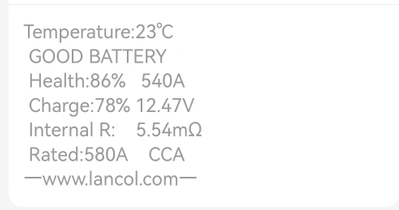
Previously, when users scanned the QR code generated by the tester with their smartphones, the test results would only appear as plain, black-and-white text. While functional, this format often made it difficult for technicians and car owners to quickly identify critical parameters at a glance.
A New Visual Experience
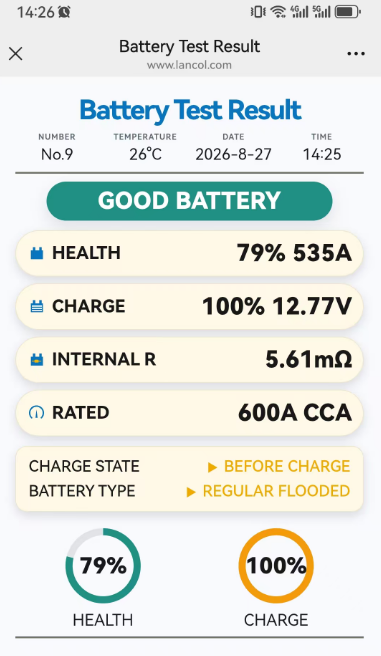
Following the latest update, the scanned interface has been fully redesigned. Instead of the old monochrome text layout, the new mobile interface now displays test data in vibrant color, complemented by clear, user-friendly icons. This visual upgrade allows users to distinguish between battery health statuses (e.g., Good, Weak, or Replace) instantly, without needing to read through dense numerical strings.
Effortless Data Management
The core workflow remains as convenient as ever: the tester generates a unique QR code for each test, users scan it with their phone, and the detailed results load directly on the mobile screen. With the new update, users can not only view a more professional and readable report but also easily take screenshots and save the colorful result images directly to their mobile devices. This makes it simpler than ever to share diagnostic evidence with customers, store service records, or forward them to colleagues for remote consultation.
Enhanced Professionalism
This upgrade transforms the battery test result from a simple piece of data into a polished digital report card. The combination of color-coding and visual icons not only improves readability in outdoor or dimly lit workshop environments but also adds a layer of professionalism when presenting results to end-users.
All new units will feature this upgraded QR code interface from today onward. Existing users can enjoy this new visual experience by simply updating their device’s firmware (if applicable) and re-scanning test reports.
Below are the screenshot for your review.
For more details about this upgrade or to place an order, please contact our sales team.
Contact: Melody 0086 18391056516 sales-2@lancol.com